Deploying ReadEase on AWS with ECS Fargate and Terraform

ReadEase is an adaptive reading platform for children who struggle with reading. The app is made up of a React frontend, a NestJS backend, a FastAPI service for ML, Redis for short-lived state, and PostgreSQL for business data. This article records the process of deploying ReadEase to AWS with Terraform, from choosing the architecture to running migrations, checking the health endpoint, and confirming media upload/download on S3.
The goal of this deployment is to create a reproducible demo environment, close enough to production to show cloud skills, while keeping cost and complexity reasonable for a portfolio project. So this is not a complete production architecture: the workload runs Single-AZ, the ALB is HTTP-only, and there is no custom domain yet.
Overall architecture
Users come in from the Internet Gateway to the Application Load Balancer. The ALB routes frontend requests to the frontend ECS service and API/WebSocket requests to the backend ECS service. Both ECS services run in a private application subnet with no public IP.
flowchart LR
    user[User] --> igw[Internet Gateway]
    igw --> alb[Application Load Balancer]

    subgraph vpc[VPC 10.0.0.0/16]
      subgraph public[Public subnets - AZ A and AZ B]
        alb
        nat[NAT Gateway - AZ A]
      end

      subgraph app[Private application subnet - AZ A]
        fe[Frontend ECS Service\nReact + Nginx]
        subgraph be[Backend ECS Service]
          api[NestJS API]
          ml[FastAPI ML]
          redis[Redis sidecar]
        end
      end

      subgraph db[RDS DB subnet group]
        dba[Private DB subnet - AZ A]
        dbb[Private DB subnet - AZ B]
        pg[(RDS PostgreSQL\nSingle-AZ)]
        dba -. active placement .- pg
        dbb -. subnet group .- pg
      end

      alb -->|/*| fe
      alb -->|/api/* and /tracking*| api
      api --> ml
      api --> redis
      api --> pg
      app --> nat
    end

    nat --> igw
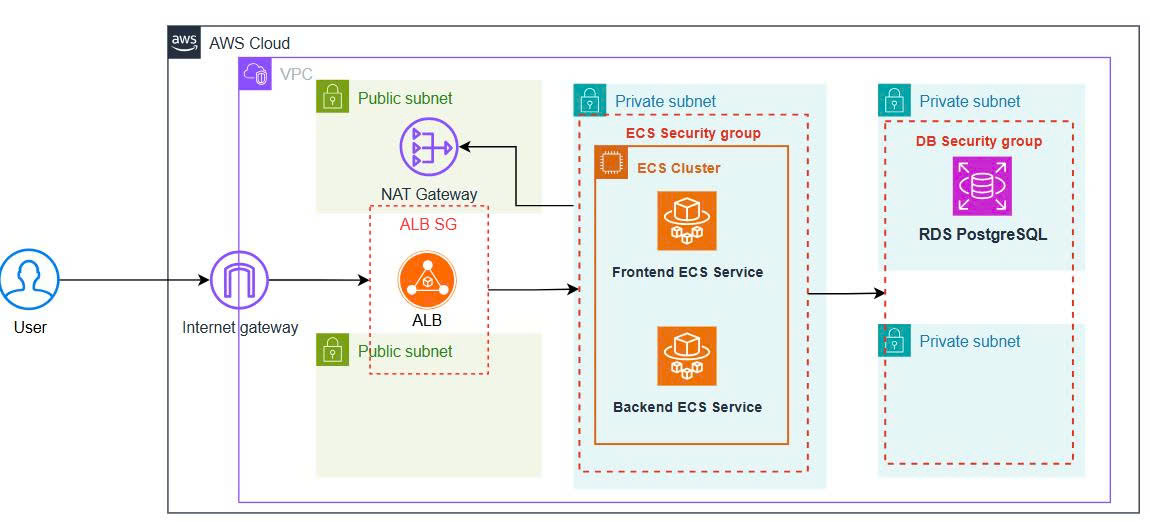
Why two private DB subnets when RDS runs in only one place?
RDS requires a DB subnet group with subnets in at least two Availability Zones. So Terraform creates Private DB A and Private DB B in a single DB subnet group. However, the multi_az = false setting makes AWS place only one active RDS instance in one subnet. The other subnet is a valid subnet so the DB subnet group satisfies the RDS requirement — it is not a standby database.
This is an easy point to get wrong when drawing the architecture diagram: you should show both subnets, but draw only one active RDS instance.
ECS: frontend and backend run separately
Frontend and backend both run on ECS Fargate, but as two independent services:
- The frontend service runs the React build behind Nginx, listening on port
80. - The backend service runs three containers in one task:
- The NestJS API on port
3000. - FastAPI ML on port
8000, accessed internally only via127.0.0.1. - Redis on port
6379, used for OTP and short-lived state.
The backend container declares a dependency so it only starts after the Redis and ML containers are healthy. Redis and FastAPI are not exposed to the Internet; they share a network namespace with the NestJS container.
The ALB has two main listener rules:
| Path | ECS target |
|---|---|
/* |
Frontend service, port 80 |
/api/* |
Backend service, port 3000 |
/tracking and /tracking/* |
Backend WebSocket endpoint, port 3000 |
Splitting the services this way lets the frontend and backend have their own lifecycle, while keeping the deployment model simpler than putting both processes in one container.
Database and migration
Terraform creates RDS PostgreSQL 16 in the private DB subnet group with these characteristics:
publicly_accessible = false.multi_az = false.- Encryption at rest.
- Master password managed by AWS in Secrets Manager.
- A security group that only allows the backend SG to reach port
5432.
After the ECS service is running, migrations are not run inside the production container that is serving requests. Instead, I run a one-off ECS task in the private application subnet, using the same backend task definition and security group:
$cluster = terraform output -raw ecs_cluster_name
$taskDefinition = terraform output -raw backend_task_definition_arn
$subnet = terraform output -raw private_app_subnet_id
$securityGroup = terraform output -raw backend_security_group_id
$network = "awsvpcConfiguration={subnets=[$subnet],securityGroups=[$securityGroup],assignPublicIp=DISABLED}"

aws ecs run-task `
  --cluster $cluster `
  --launch-type FARGATE `
  --task-definition $taskDefinition `
  --network-configuration $network `
  --overrides '{"containerOverrides":[{"name":"backend","command":["npm","run","migration:run"]}]}'
The migration task successfully ran all 19 TypeORM migrations and finished with exit code 0.
The backend connects to RDS over TLS. In the demo, DB_SSL_REJECT_UNAUTHORIZED=false to simplify bundling the RDS CA bundle. In a production deployment you should mount the AWS RDS CA bundle and enable certificate verification.
Moving storage from Supabase to S3
A real bug showed up right after the first deploy: creating reading content returned HTTP 500 because the backend code still called Supabase Storage, while the deployment had no Supabase credentials.
Terraform had already created a private S3 media bucket and granted an IAM policy to the backend task role, so the sensible fix was to switch the storage adapter to S3 rather than opening a public bucket or re-adding a dependency outside AWS.
StorageService now prefers S3 when the S3_MEDIA_BUCKET variable exists, and still supports the Supabase fallback for the old environment. Objects are uploaded to S3 with server-side encryption AES256. Because the bucket stays private, the backend returns a proxy URL on the same ALB:
/api/v1/upload/file/content?key=stories/...
When the frontend reads content, the request goes through the backend, which uses the task role to fetch the object from S3 and returns the content to the browser. This keeps the bucket private and avoids storing a short-lived presigned URL in the database.
To confirm IAM and the adapter actually work, I ran a one-off ECS smoke test:
- Upload a small text file to S3.
- Download the object again.
- Compare the received content with the original.
- Delete the test object.
The log returned S3_SMOKE_OK, and all three containers in the task exited with code 0.
Terraform workflow
Terraform is split into parts along ownership boundaries: network, security, ECR, logs, secrets, S3, RDS, IAM, ALB, and ECS. deploy_services defaults to false so the platform and ECR can be created first, images pushed later, and only then the ECS services enabled.
The deployment flow:
terraform init
terraform fmt -check
terraform validate
terraform plan -out readease.tfplan
terraform apply readease.tfplan
Once the images are in ECR, set deploy_services = true and run plan/apply a second time to create the frontend and backend services.
When an image needs updating, the tags are split into frontend_image_tag, backend_image_tag, and ml_image_tag. This avoids the case where changing the backend tag makes the frontend or ML point to a tag that does not exist. The S3-fix deployment uses the immutable tag s3-storage-20260719-1 instead of latest.
The most important thing in the workflow is not to apply directly after changing code. The plan for the S3 rollout showed exactly:
1 to add, 1 to change, 1 to destroy
The resource being destroyed is the old task definition revision, replaced by a new revision; the ECS service, VPC, subnets, RDS, S3, IAM, and frontend are not deleted. After apply, the final plan returned:
No changes. Your infrastructure matches the configuration.
Verification results
After the deployment, the main checks all passed:
- Frontend target on the ALB:
healthy. - Backend target on the ALB:
healthy. GET /api/v1/health: HTTP200.- The health response confirms PostgreSQL is reachable.
- 19 database migrations completed.
- S3 upload/download/delete smoke test: pass.
- Unit tests for the S3 adapter and content service:
13/13pass. - Terraform validate: pass.
- Final Terraform plan: no changes.
The current application endpoint:
http://readease-demo-alb-1388515170.ap-southeast-1.elb.amazonaws.com
What would be done differently for production?
The current architecture is fine for a demo and portfolio, but should not yet be used for real children's data. The next steps are:
- Add a custom domain, an ACM certificate, and move the ALB to HTTPS.
- Use Multi-AZ for the ECS workload and RDS.
- Replace the ephemeral Redis sidecar with a service that has persistence and failover.
- Configure production SMTP to send OTPs, instead of logging OTPs in DEV mode.
- Add a Gemini API key to fully enable the AI features.
- Set up CloudWatch alarms, a dashboard, tracing, and alerting.
- Add CI/CD with immutable image tags per commit SHA.
- Protect the Terraform state with a remote backend and state locking.
- Re-evaluate IAM, retention policy, backups, and data privacy before storing real data.
Conclusion
The most valuable part of this deployment was not just creating a VPC or an ECS cluster. The harder part was wiring the components into a system you can verify: private subnet to NAT Gateway, ECS to RDS over TLS, the ECS task role to private S3, migrations running independently, and the ALB routing correctly to two services.
ReadEase now runs on AWS with a separate frontend and backend, a private database, private media on S3, and the whole infrastructure managed by Terraform. For an academic or portfolio project, this is a good starting point to keep moving toward HTTPS, Multi-AZ, observability, and production-grade CI/CD.