From Messy Bank Statements to AI Insights in 48h: An AWS-Native AI Money Coach System Design
I. The Problem: the "pain" of managing personal finances
"What did I even spend on this month that my money ran out so fast?"
Almost all of us have asked ourselves that question when facing a shrinking account balance at the end of the month. Usually we have two ways to find the answer: open the banking app and scroll back through a list of dry, abbreviated transactions like FT261982739281 VND..., or download a budgeting app and start diligently logging everything by hand.
But the harsh reality is that most people give up after just three days because manually entering every small expense is exhausting. Forcing users to log transactions by hand is a design that isn't truly optimized for human behavior.
When we joined the XBrain AWS Accelerator competition, our Group 4 team decided to solve this pain point once and for all by building BudgetBot — an AI Money Coach for Vietnamese users. The core idea is simple: the user just uploads a bank statement file (CSV, Excel, PDF) or a payment screenshot (VCB, Techcombank, MoMo...) -> the AI automatically classifies the transactions, computes the budget, and chats directly to give spending advice.
Building an AI app that runs smoothly on a local machine is one thing; getting it onto the AWS cloud to run reliably, protect sensitive financial data, and optimize cost under real load is an entirely different problem. Below is the story of our real-world cloud architecture design during that pressured 48-hour journey.
II. The "Ah-ha" Moment: infrastructure architecture and design decisions
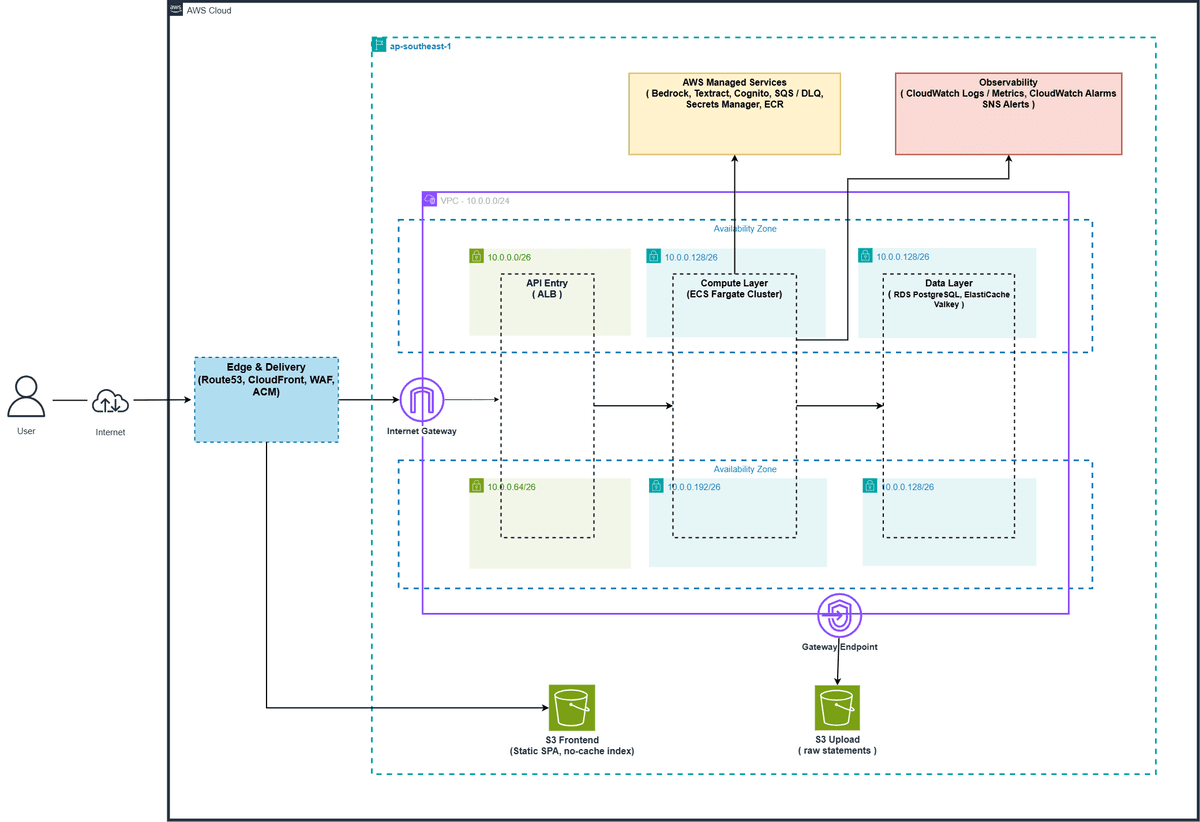
BudgetBot's AWS infrastructure is designed to serve a real production environment, split into clear tiers to ensure high availability, layered security, and automatic scaling with load.
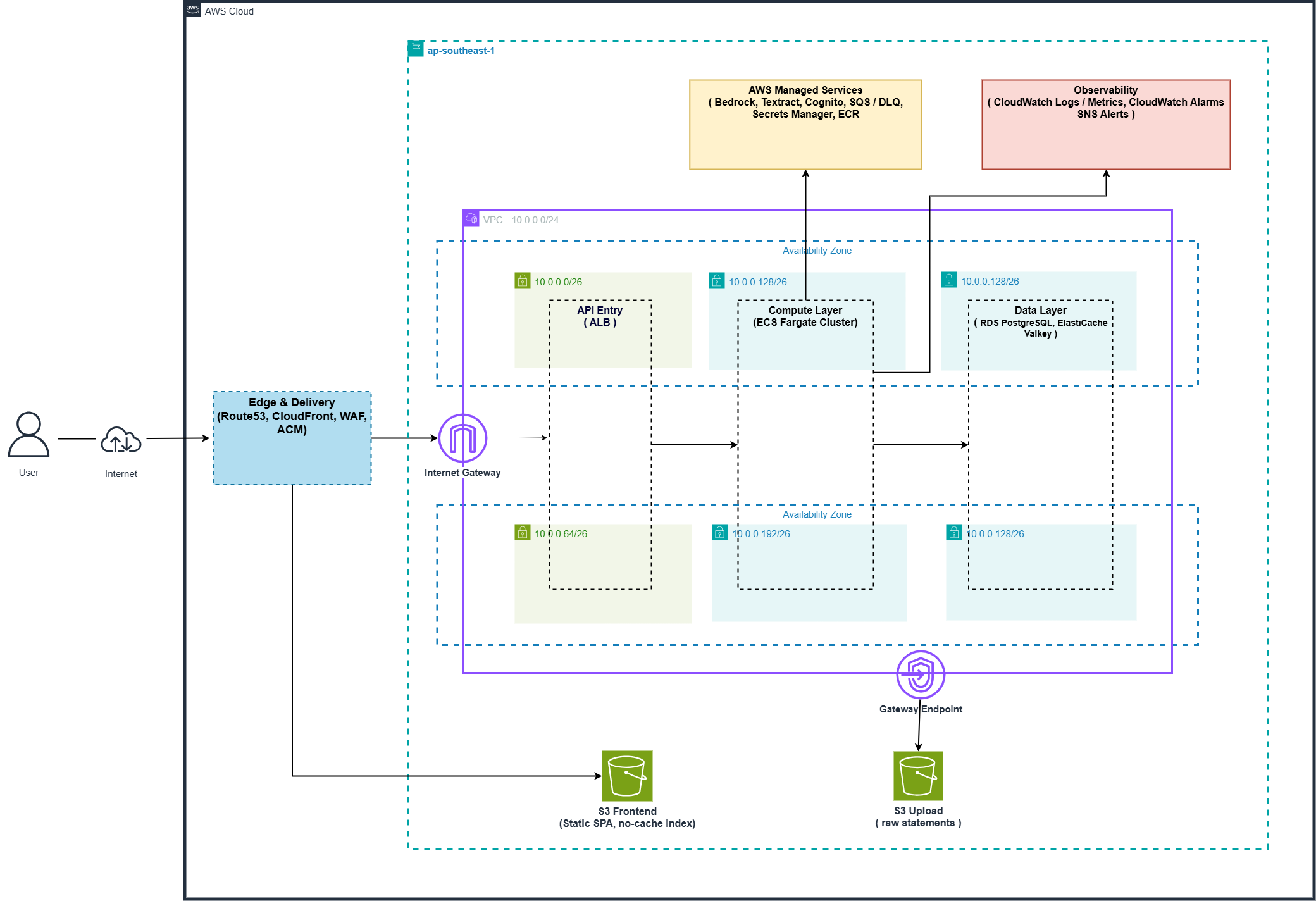
Diagram: The overall BudgetBot system architecture on AWS Cloud.
While designing this infrastructure, we made two key architectural decisions that completely changed the app's performance and operating cost:
1. Why choose ECS Fargate over AWS Lambda for the background worker?
Initially the team discussed using Lambda Serverless for the worker that processes statement files, for its convenience and fast deployment. However, Fargate was chosen for the following real-world reasons:
- Working around the hard timeout limit: Running image OCR of payment screenshots through Textract, or calling Bedrock batch-classification for thousands of transactions, are heavy and time-consuming tasks. AWS Lambda is capped at a 15-minute maximum execution time and is easily cut off midway. The ECS Fargate Worker has no execution-time limit, guaranteeing 100% of the work completes.
- Better cost predictability: Lambda bills linearly by request count and execution time in milliseconds. Under large, continuous load, Lambda cost grows progressively and is very hard to control. ECS Fargate runs steadily, lets you manage a minimum/maximum capacity, and optimizes cost better for long, continuous compute tasks.
- Managing connection pooling to the database: Every time Lambda scales out aggressively, it opens thousands of concurrent connections to RDS PostgreSQL, easily exhausting the connection pool and taking the database down. For the long-lived Fargate Web/Worker containers, we configure connection pooling at the application level (the SQLAlchemy/psycopg2 libraries) directly in the app source code, reusing connections instead of opening/closing one per request, protecting RDS from connection overload.
2. Infrastructure cost optimization: NAT Gateway bypassed & security via VPC Endpoints (PrivateLink)
A NAT Gateway running continuously costs about ~$32/month in fixed maintenance (not counting data-processing fees) — a significant amount for an MVP/Hackathon project. To optimize cost, we made a bold decision: no NAT Gateway and no private subnet for compute.
Instead, all ECS Fargate containers running the backend API and the Fargate Worker are deployed on public subnets with an automatically assigned public IP (assign_public_ip = true). This design lets containers connect directly to the internet through the Internet Gateway to pull external libraries or update the system without a NAT Gateway.
But for sensitive financial data, how do we ensure network security without a private subnet for compute? We solved it with a three-layer network security design:
- Database isolation: RDS PostgreSQL and the Valkey cache are configured with
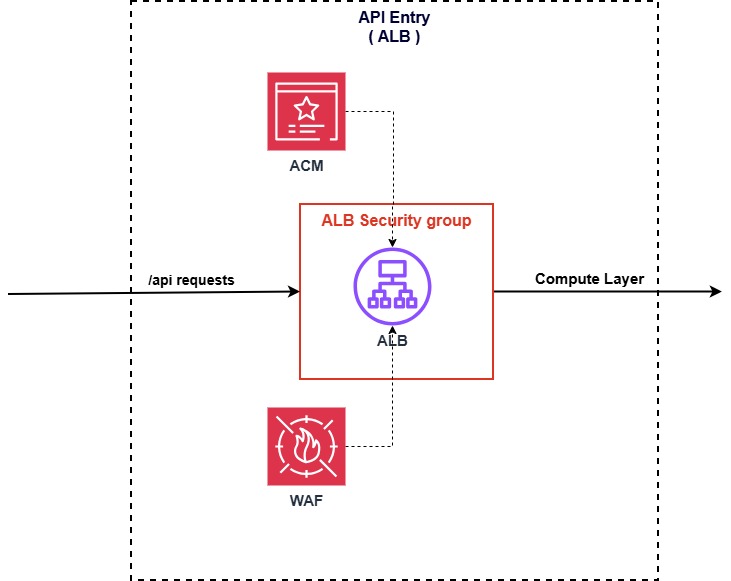
publicly_accessible = false, and their Security Groups only allow traffic coming from the ECS Fargate container's Security Group. Any direct access from the outside internet is absolutely blocked. - AWS WAFv2 & ALB: Standing at the edge on CloudFront and the ALB to filter out malicious traffic before it reaches the API. WAF is configured with the AWS Managed Rules Common Rule Set (CRS) to defend against the OWASP Top 10, and IP Rate Limiting capping each IP address at 2,000 requests per 5 minutes to prevent DDoS and API spam.
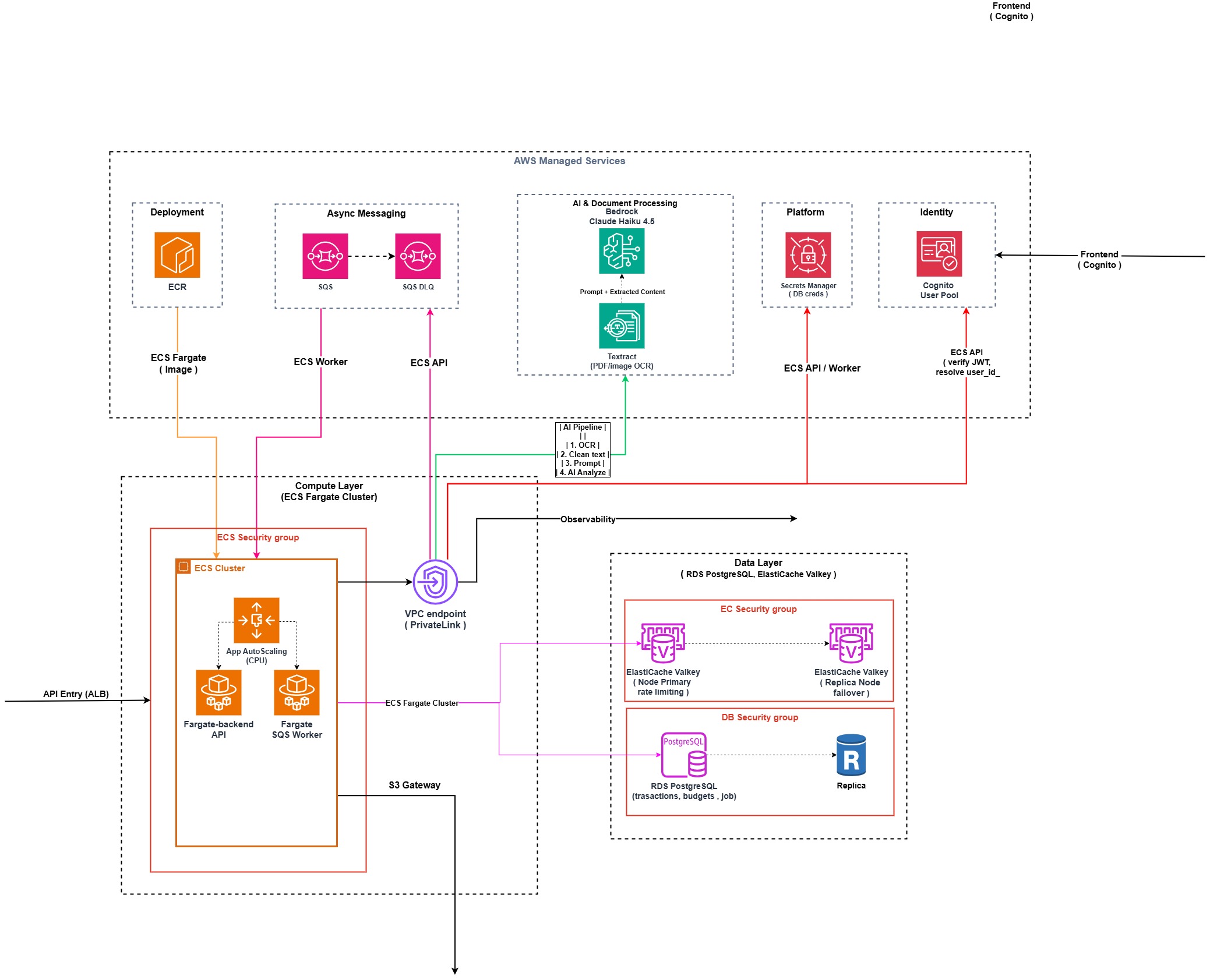
- Internal VPC Endpoints (PrivateLink): To connect to sensitive AWS services such as S3, Bedrock, Textract, SQS, Secrets Manager, and CloudWatch Logs, we do not let data travel over the public internet. We set up VPC Interface Endpoints and Gateway Endpoints directly inside the VPC. All sensitive data traffic (statement files, invoice images, API keys, AI tokens...) flowing from the Fargate containers to AWS services stays entirely on AWS's internal backbone through PrivateLink, which significantly reduces data-processing cost through the NAT Gateway while providing strong protection against eavesdropping attacks.
III. The Journey of a Transaction
Let's follow the path of a bank statement file — for example VCB_Statement_04.csv — from the moment the user uploads it until the data shows up on the dashboard:
1. The edge async processing flow
- To make sure users access BudgetBot with the lowest latency from anywhere in Vietnam, we use Amazon Route 53 for smart routing combined with Amazon CloudFront to distribute the static React SPA stored on Amazon S3 (protected with Origin Access Control - OAC).
- When the user drags and drops
VCB_Statement_04.csvonto the UI, the browser sends aPOST /uploadrequest to the API backend (running on ECS Fargate behind the ALB). - The FastAPI backend generates a secure S3 pre-signed URL and returns it to the browser. The browser then uploads the
VCB_Statement_04.csvfile directly to the Amazon S3 (Uploads Bucket) using that pre-signed URL, freeing up bandwidth on the API server. - After a successful upload, the browser sends a
/enqueueprocessing request to the API. The backend records the job status asQUEUEDin RDS PostgreSQL, sends a message containing the job metadata to Amazon SQS, and immediately returns a202 Acceptedto the frontend so the UI is never blocked.
2. Background processing in the worker
- The message in SQS is delivered to an idle ECS Fargate Worker. The SQS Visibility Timeout (300 seconds) protects the task; if the Fargate Worker crashes midway, the task automatically reappears in the queue for another worker to pick up. If it fails 3 times in a row (for example, a corrupted file), the message is automatically moved to the Dead Letter Queue (DLQ) for a developer to inspect manually.
- The Fargate Worker receives the message, downloads
VCB_Statement_04.csvfrom S3 into temporary memory, and begins pre-processing.
3. The four-level deduplication algorithm (Data Integrity)
Before writing to the database, transaction data passes through a strict deduplication filter:
- Level 1 - File Hash SHA-256: Compares the hash of the entire file to skip it if the user uploads a duplicate file.
- Level 2 - Transaction Fingerprint: Creates a signature based on the attribute set
[Amount + Description]combined with a Date Tolerance algorithm (a 1-3 day tolerance) to merge transactions that are really the same but were booked by the bank on different dates due to weekends. - Level 3 - Soft warning: Warns if a manually entered transaction is a duplicate.
- Level 4 - PDF anti-duplication: Matches PDF fingerprints to avoid scanning duplicate invoices.
4. The classification pipeline & AI optimization
After deduplication, transactions go through a smart classification system:
- Stage 1: Rule-based (Keyword Matching): The worker runs keyword checks via a Vietnamese regex dictionary mapped in code (for example:
GRAB-> Transport,HIGHLANDS-> Food), successfully classifying ~65% of ordinary transactions at a cost of $0. - Stage 2: LLM Inference (Bedrock): The remaining 35% of ambiguous transactions are grouped into batches (batches of 10 rows) and sent to Amazon Bedrock (Claude Haiku) for classification.
- Optimizations: We separate the System Prompt and the few-shot examples so Bedrock can optimize Prompt Caching, giving up to 90% cost reduction on cached input tokens.
- Resilience: If Bedrock errors out or throttles, the system automatically falls back to the offline rule-based classification of LocalAI with a
needs_review=Truelabel, keeping the app highly available. - Storage & completion: A classified transaction is written to RDS PostgreSQL. The worker updates the job status to
COMPLETEDand proactively calls thes3.delete_objectAPI to delete the original statement file on S3 immediately. An S3 Lifecycle rule configured to delete after 7 days (the minimum period per AWS's scan cycle) acts as a backup cleanup. - UI update: The React SPA frontend uses React Query to continuously poll the
/job-statusendpoint and instantly updates the financial dashboard the moment it detects the job is complete.
IV. Security by Design: protecting personal financial data
Bank statement data is highly sensitive information (PII - Personally Identifiable Information). BudgetBot puts strict data-security mechanisms in place:
- AI Data Protection Policy: We configure Amazon Bedrock with a Data Protection Policy to prevent input data from being used to train models, and data is encrypted at rest with the default AWS managed KMS keys of the RDS (
aws/rds) and S3 (aws/s3) services. AWS commits to never using customers' prompt/response data to train third-party foundation models (such as Anthropic Claude). - Amazon Textract: The service extracts text on the fly in memory and does not retain any of the customer's invoice documents after processing completes.
- Network & identity isolation: All data travels over secure internal VPC Endpoints. User identity is isolated through Cognito User Pools.
V. Cost Optimization: the real cost analysis (The Math)
To demonstrate BudgetBot's practicality and cost-optimization capability, here is an estimated cost table based on a benchmark running the project's cost_estimate.py script for a volume of 1,000 transactions/month:
| Service item | Monthly cost (USD) | Description & optimization |
|---|---|---|
| Amazon Bedrock (Claude Haiku) | ~$0.0166 / 1,000 txns | Only calls 35% of transactions. Up to 90% cost optimization via Prompt Caching for cached input tokens. |
| Amazon RDS PostgreSQL | ~$13.00 | Uses db.t3.micro (gp3, 20GB, storage encrypted). |
| Amazon ECS Fargate | ~$16.00 | Runs 2 Fargate Tasks (0.25 vCPU, 0.5 GB RAM) for HA. |
| Amazon S3 (Uploads) | ~$0.50 | Minimal temporary storage, files deleted right after processing. |
| Other services (SQS, WAF, Route53) | Free Tier / Negligible | Negligible cost at small scale. |
| TOTAL ESTIMATED COST | ~$30.00 / month | Production-ready with optimized cost. |
By weaving in an offline keyword-matching mechanism to handle 65% of ordinary transactions and enabling Prompt Caching on Bedrock, BudgetBot's variable AI cost is optimized to nearly zero (under 2 cents per 1,000 transactions). The infrastructure maintenance cost is mostly in the fixed storage and compute services that keep the system always ready and cost-predictable.
VI. Conclusion & lessons learned
Designing and deploying BudgetBot on AWS Cloud gave us valuable real-world lessons:
- Financial data security from the ground up: A secure-by-design infrastructure with VPC Endpoints and isolated Security Groups is mandatory for FinTech applications handling PII data.
- Smart cost optimization: You don't necessarily need an expensive NAT Gateway if you know how to leverage public subnets combined with internal VPC Endpoints to save cost while keeping the data flow secure.
- IaC enables automation: Defining the entire infrastructure with Terraform makes deploying, scaling, and tearing down resources fast, accurate, and consistent across the whole development team.
Project source code: github.com/dragoncoil2609/fintech

